
November 16, 2026
Get a real spreadsheet from a sentence
Not a table pasted into a chat. An Excel file with working formulas, saved in your folder, ready to send.
At the end of the month, a freelancer has a list of jobs and a client asking for a summary. The numbers are already there. Getting them into a sheet with totals is half an hour of copying that nobody enjoys.
Ask for the file
Paste the numbers into the chat, or point Ainex at the file they are in, and say what you want.
Try itPut last month's numbers into a spreadsheet with totals.
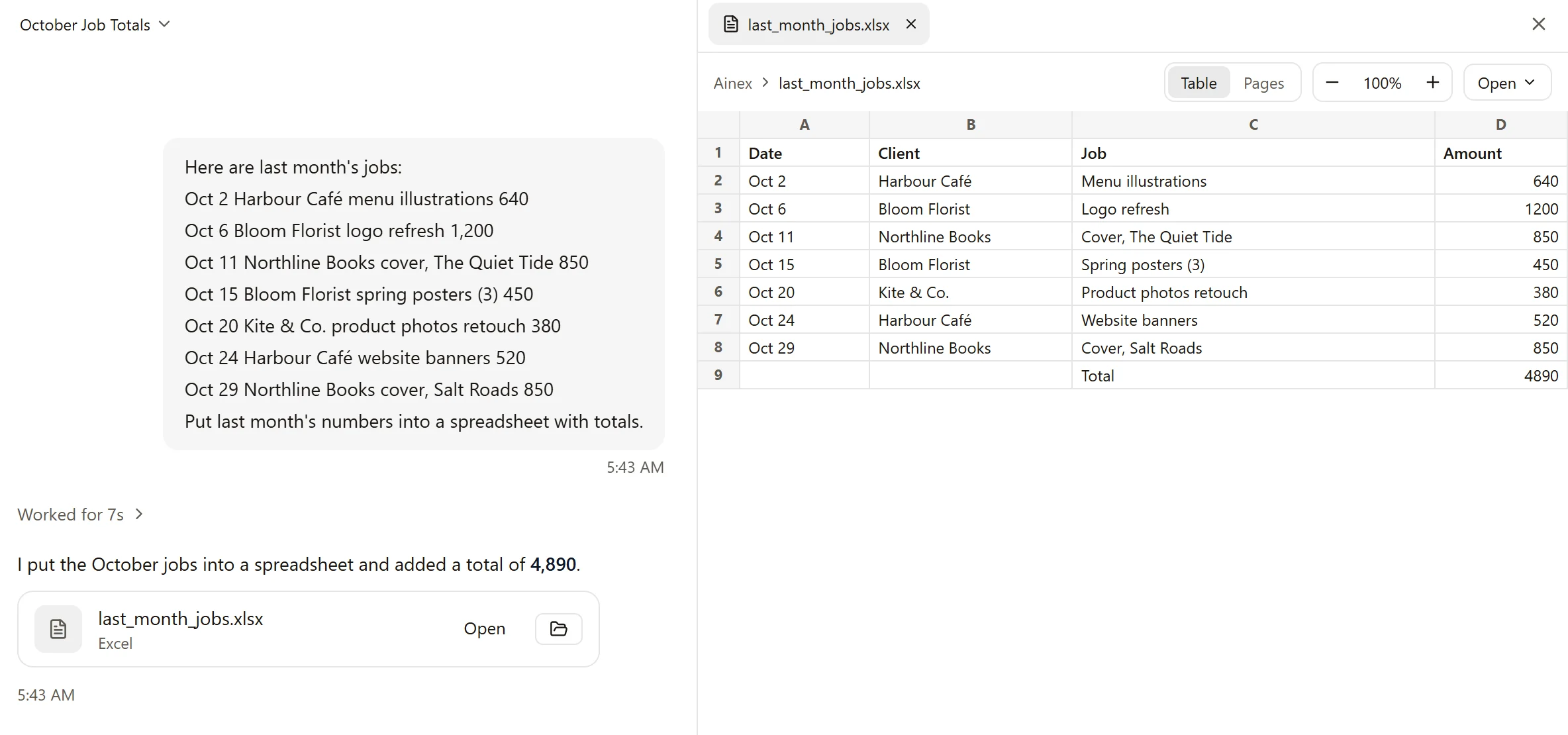
Ainex builds the sheet and saves it in your work folder as an Excel file. Ours took seven seconds. Click the file in the reply and the sheet opens beside the chat; Open hands it to Excel, or to whatever you use for spreadsheets.
Formulas, not typed-in numbers
This is the part that matters. The total at the bottom is a formula, =SUM(D2:D8) in ours, not a number someone typed in. Change an amount and the total follows, the way it would in a sheet you built yourself.
That is the difference between a file and a picture of a file. A table in a chat window has to be copied out and rebuilt. This one you can send to the client as it is.
Word, PowerPoint and PDFs
Word documents, PowerPoint decks and PDFs work the same way. Ask for the file, and you get the file.
More from the blog
November 16, 2026
Change one part of a picture and keep the rest
When one part of a picture is wrong, you don't have to start over. Mark it, say what you want there, and Ainex changes that part.
November 16, 2026
Take a picture apart into layers
A finished picture is one flat sheet. Ainex can lift its parts out, each on its own layer, so you can move them, restyle them, or carry on in Photoshop.
November 16, 2026
Turn a picture into a vector you can edit
A logo that has to go on a pen and on a van can't be a grid of pixels. Ainex turns a picture into an SVG: shapes you can scale to any size and edit point by point.